Your account Step 25 of 30
The access log
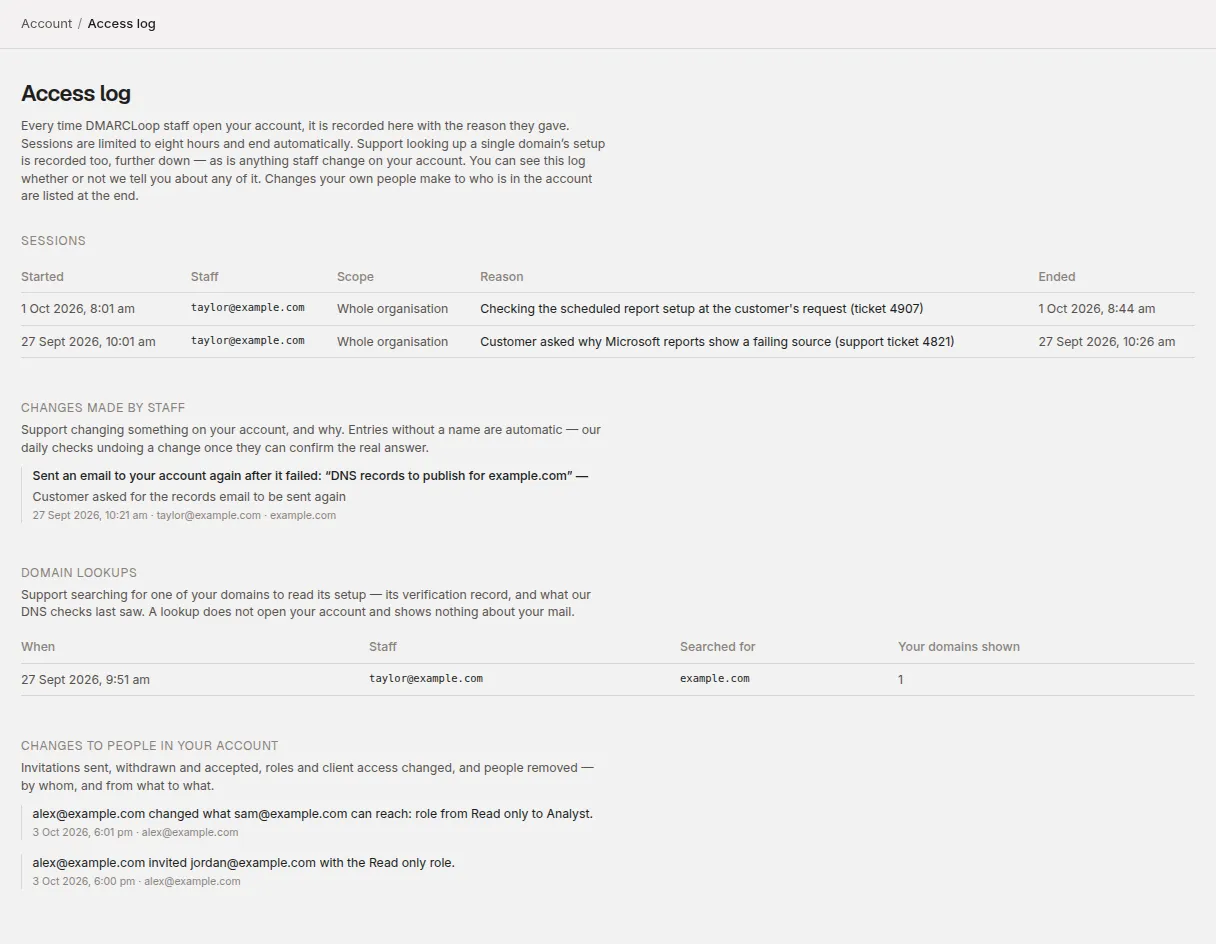
Account → Access log records every time DMARCLoop staff open your account, look up one of your domains or change something, with the reason they gave.
Updated
Account → Access log is the record of DMARCLoop staff reaching into your account. Support can’t see your reports without opening a session against your account, and every session is listed here with the reason the staff member wrote down. You can read it at any time, whether or not we’ve told you about the access.
It also records changes to who is in your account made on Account → People: invitations sent, withdrawn and accepted, a member’s role or client access changed, and members removed. Apart from those, it isn’t a log of what members of your own account do.
Who can see it
Every member of the account, whatever their role. What each person sees follows their access:
- A member whose access covers particular clients sees only entries about their own clients and their domains, plus anything staff did to their own login. Entries about the account as a whole — a session opened on the whole organisation, a plan move, a change to someone else’s login, and every change to people in the account — aren’t shown to them. The page tells them so: Your access covers part of this account, so only entries about your clients and their domains, and anything staff did to your own login, are listed here — not those about the account as a whole.
- An owner or admin who can see every client sees everything.
- An analyst or read-only member who can see every client sees everything except staff changes to billing: a plan move, contract terms, how your statements are invoiced, your billing details, and your statements. Those stay with the people who can open Billing, as do re-sent billing emails.
If nothing has ever been recorded, the page says Nothing has been recorded yet. Otherwise each section that’s empty says so on its own line — for example, No staff session has been opened on your account. under Sessions.
Sessions
Each time a member of DMARCLoop staff opens your account, a row is added under Sessions:
| Column | What it shows |
|---|---|
| Started | When the session began. |
| Staff | The staff member’s email address. |
| Scope | Whole organisation, or the one client they opened. |
| Reason | The reason they gave, exactly as they wrote it. A reason is required to start a session. |
| Ended | When it ended, Open now if it’s still running, or when it expired. |
Sessions are time-limited: they last an hour unless the staff member sets a shorter or longer time, never more than eight hours, and they end on their own. While any are running, the top of the page says how many are open right now.
Some things can’t be done from inside a session at all, because they would outlast it: support can’t send or withdraw invitations, remove people, change someone’s role or client access, change hosted records, turn on failure reports, change alert channels, create a scheduled report or change your logo, set up single sign-on or issue provisioning tokens, or change your notification switches while viewing your account.
Changes made by staff
If support changes something on your account, it’s listed under Changes made by staff with what changed, the reason given, when, and who. Examples:
- marking a domain verified when our DNS check couldn’t confirm it, and our check later confirming or reverting it
- moving the account to a different plan
- creating a login for someone, changing what they can reach, or suspending or restoring a login
- removing two-factor authentication from someone’s login at their request (below)
- turning off a requirement to sign in through your identity provider
- sending an email to your account again after it failed
Two-factor authentication removed
If someone in your account loses the phone their authenticator app is on and their backup codes, they can ask us to remove two-factor authentication from their login (see Set up two-factor authentication). When we do, the log of every account they belong to records it, with the reason we wrote down. It’s an entry about the account as a whole, so members who can see every client see it — and so does the person whose login it was, whatever clients they can see:
Removed two-factor authentication from the login belonging to their address and signed it out on every device, so it signs in without a code until it is set up again —
Until they set it up again, it signs in with its password, or however else it signs in, without a code. They’re emailed as well. If you see this entry and nobody in your account asked for it, contact us straight away.
Entries without a staff name are automatic: our daily DNS check undoing a change once it can confirm the real answer.
Changes to people in your account
When someone in your account sends or withdraws an invitation, uses change access on a member, or removes a member, and when someone accepts an invitation, the log records it at the end of the page under Changes to people in your account — who did it, to whom, and when. A role or client change shows what the member had before and after, for example alex@example.com changed what sam@example.com can reach: role from Read only to Analyst.
These entries are about the whole account’s membership, so only members who can see every client see them. A member whose access covers particular clients sees none of them, whichever clients are involved.
Domain lookups
Domain lookups lists each time support searched for one of your domains to read its setup — the verification record and what our DNS checks last saw — without opening your account. It shows When, the Staff member, what they Searched for and how many of Your domains shown. A lookup shows nothing about your mail.
How much is shown
The page shows the most recent 100 entries in each section. Entries aren’t removed when a staff member leaves DMARCLoop: deleting a staff account can’t erase what it did.
Questions about an entry
If an entry doesn’t match a support conversation you know about, contact us with the date and the staff member’s address.
Stuck? Reply to any email DMARCLoop sends, or contact us — a person reads it.