Moving to enforcement Step 8 of 30
Identify your sending sources
Between the first report and day 14, work through the servers sending as your domain — authorise the ones that are yours, and leave the rest to the policy.
Updated
Moving to a stricter DMARC policy is safe once every legitimate sender of your mail passes DMARC. The first two weeks are for finding out who those senders are. Most domains have more than their owners expect: the mail platform, plus a CRM, a helpdesk, an invoicing system, a website contact form, a scanner in the office.
Open the source list
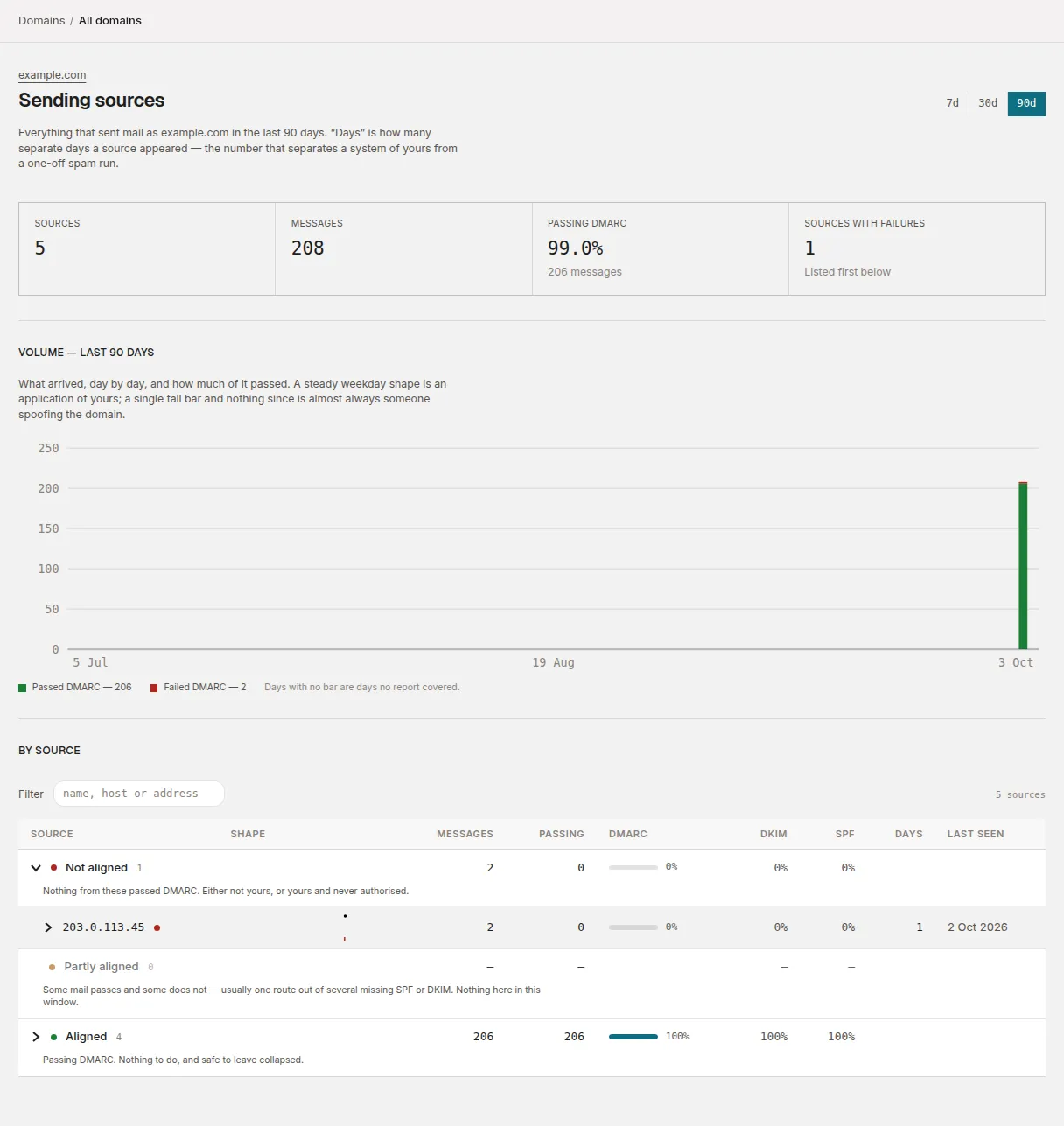
From the domain page, choose Sending sources (or Reports → Sending sources for every domain at once). Sources are grouped by how their mail did:
| Group | What it means |
|---|---|
| Not aligned | Nothing from these passed DMARC. Either not yours, or yours and never authorised. |
| Partly aligned | Some mail passes and some doesn’t — usually one route out of several missing SPF or DKIM. |
| Aligned | Passing DMARC. Nothing to do. |
Each source is shown by the most useful name we have for it: the sending service when we recognise it, otherwise the server’s own hostname, otherwise its IP address. How DMARCLoop identifies sources explains the details.
Decide what each failing source is
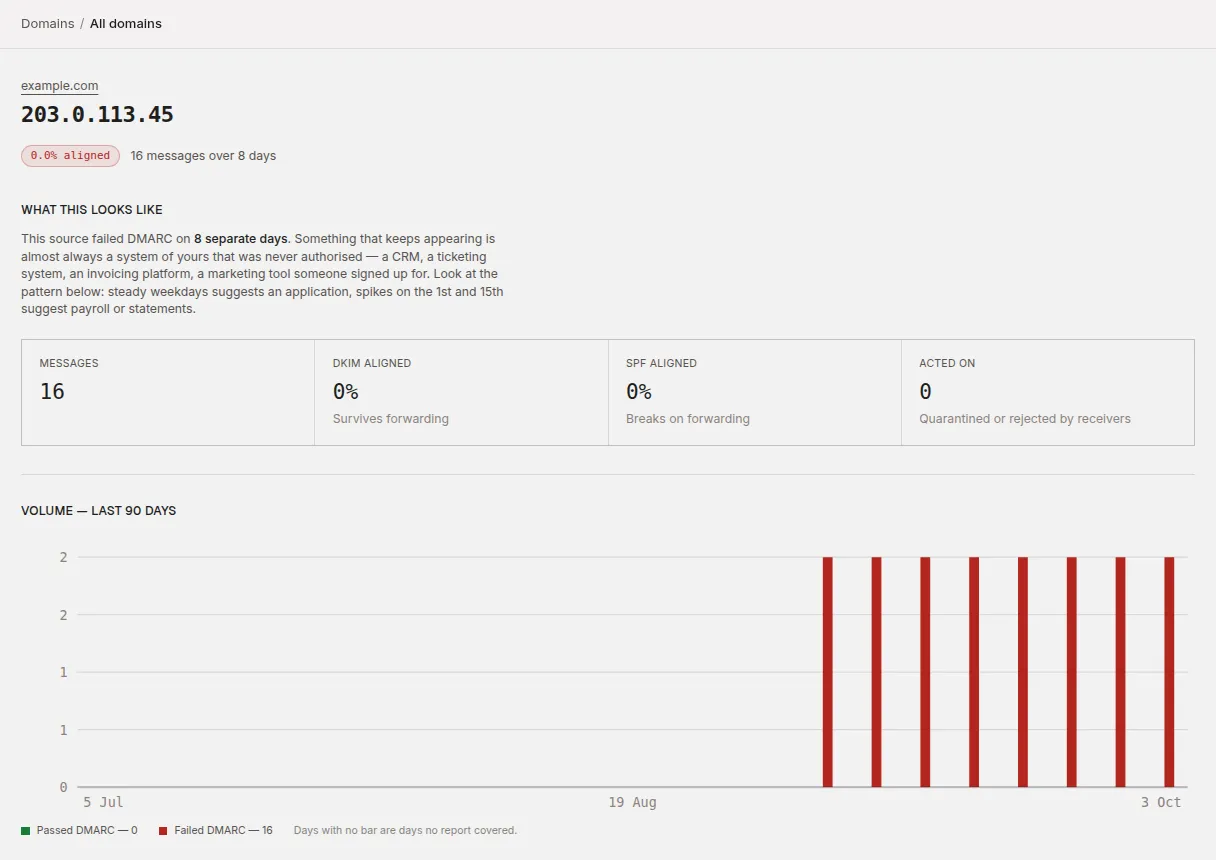
Open a source to see its mail day by day. The shape usually tells you what it is:
- Steady volume on most days is a system. Something of yours, or something sending on your behalf, that hasn’t been authorised yet.
- A single burst, then nothing, from addresses you don’t recognise, is almost always someone spoofing the domain. That’s what DMARC enforcement is for, and there’s nothing to fix.
- Mail that passes some days and fails others is often forwarding: a mailing list or a recipient’s auto-forward re-sending your mail.
Authorise the ones that are yours
For each legitimate sender that fails, set it up to send as your domain, in the sending service’s own settings:
- DKIM is the better fix where the service supports it: it publishes a key under your domain (usually one or two CNAME or TXT records it gives you) and signs your mail with it. DKIM survives forwarding.
- SPF — adding the service’s
include:to your SPF record — also works, but only aligns when the service sends with your domain as the envelope sender, and fails once the mail is forwarded. Watch the ten-lookup limit as you add services.
Why SPF and DKIM can pass while DMARC still fails covers the alignment rules if a source passes SPF or DKIM but still shows as not aligned.
The change shows up in the reports from the next day onward. A source you’ve fixed moves to Aligned; one that keeps failing stays in front of you.
DKIM selectors
A DKIM key lives at <selector>._domainkey.<your domain>, under a selector
name the sending service chose, and there’s no way to list a domain’s
selectors from DNS. So DMARCLoop checks the ones listed under DKIM
selectors on the domain page. In the page’s words: A selector that passes
DKIM for your domain in your reports is added automatically; add any others
your mail provider gave you.
Each selector shows its full name and two notes: where it came from (Added by you or Seen in reports) and what the last DNS check found (Key published, No key found or Not checked yet). With nothing listed, the section says No selectors yet, so no DKIM keys are being checked.
A selector learned from a report only counts once a key is published under it. Until then it’s marked Seen in a report, but no key is published — this is ignored until one is. It isn’t treated as a missing key anywhere, including the compliance report, because anyone can name a selector in a report.
- To add one (Analyst role or above), enter just the selector — the
part before
._domainkey, likeselector1orgoogle— under Add a selector and choose Add selector. The DNS is checked straight away. Up to 20 selectors are checked per domain. - To remove one (Analyst role or above), choose Remove next to it. A selector you remove isn’t added back by later reports.
- If the domain uses hosted records, you can still remove a selector, but Remove asks first: Hosted records are on for this domain, and they serve a key for every selector listed here. Once the selector is removed we stop keeping its key up to date, so if its DKIM record points at us, mail signed with it can start failing DKIM. Point that record back at your mail provider first, unless nothing signs with this selector any more. Choose Remove selector anyway to go ahead, or Cancel.
Only selectors that pass DKIM for exactly your domain are learned from reports, and reports add at most ten, so spoofed mail signed with invented selectors doesn’t fill the list.
Next
Stuck? Reply to any email DMARCLoop sends, or contact us — a person reads it.