Moving to enforcement Step 13 of 30
SPF and the ten-lookup limit
Why an SPF record stops working as you add senders, how DMARCLoop tells you, and what hosted SPF flattening does and refuses to do.
Updated
A receiver checking SPF may make at most ten DNS lookups to evaluate your
record (RFC 7208). Past ten, it stops and returns permerror, and most
receivers then treat the domain as if it published no SPF record at all.
Nothing visibly breaks on the day you cross the line. Mail that DKIM signs still passes DMARC. Mail that relies on SPF to align starts failing, and the record still looks correct to anyone reading it.
What counts
| In your record | Lookups |
|---|---|
include: |
1, plus everything inside the included record |
a, mx |
1 each |
ptr, exists: |
1 each |
redirect= |
1, plus everything in the target record |
ip4:, ip6:, all |
0 |
The nesting is what catches people. This record looks like it costs three:
v=spf1 include:_spf.example.net include:mail.example.org mx -all
But if _spf.example.net itself includes three more records and
mail.example.org includes two, the real cost is eight. Add one more service
whose record includes two others and you are at eleven, without having
written anything that looks long.
There is a second, smaller limit: no more than two void lookups, meaning
mechanisms that point at names returning no answer. An include: for a
service you stopped using, whose record has since been deleted, uses one.
Check a record
The free SPF Check expands a domain’s whole include tree and counts the lookups and void lookups against both limits. Run it after adding a sending service, and after a service tells you it has changed its SPF instructions.
What DMARCLoop shows for your domains
DMARCLoop reads every domain’s DNS daily. SPF is your record, not one we asked you to publish, so it is reported rather than judged:
- The domain page’s DNS summary shows SPF as Published or Not published.
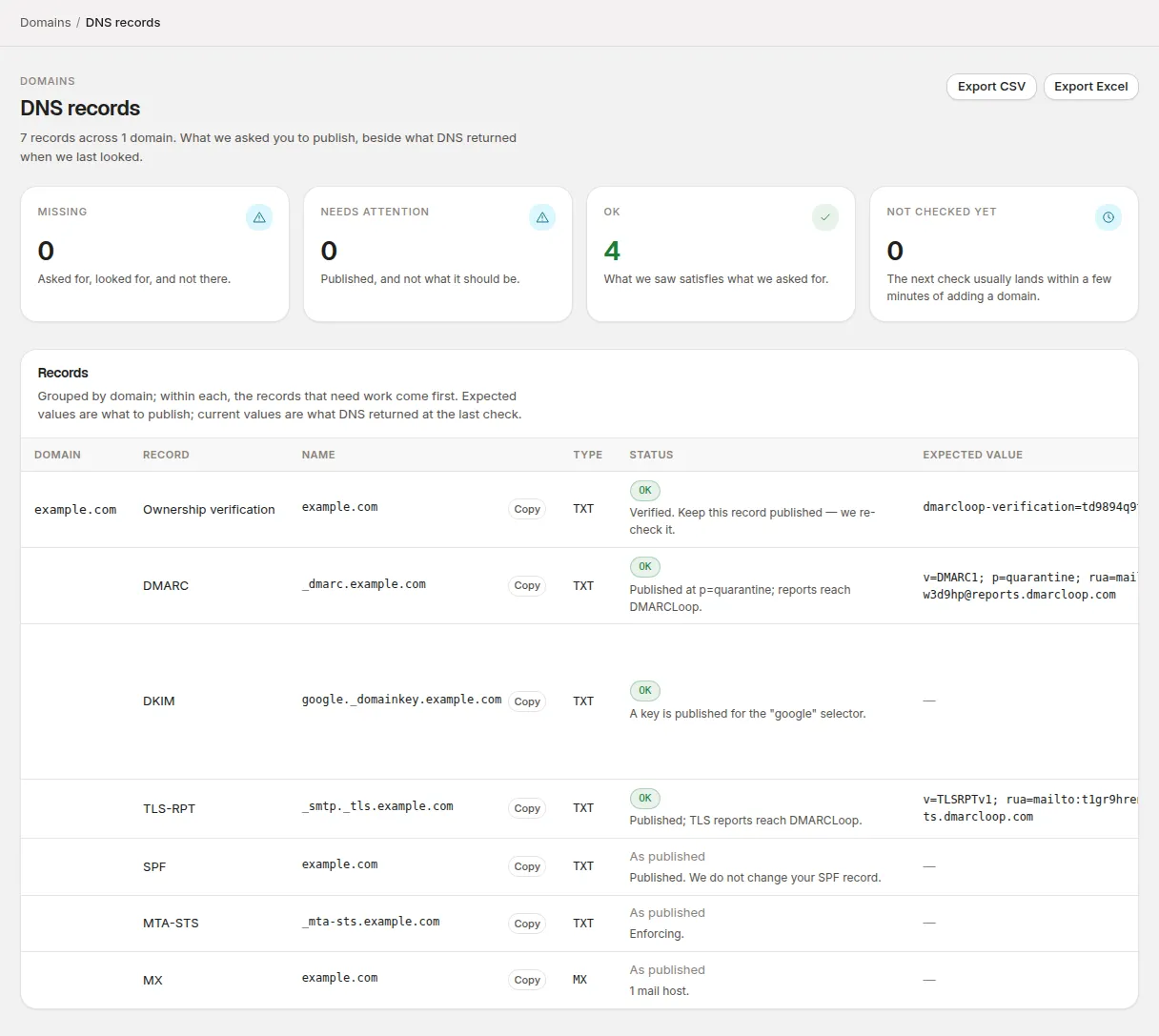
- Domains → DNS records lists the record itself, marked As published: Published. We do not change your SPF record.
- If DMARCLoop hosts SPF for the domain, the record on your
domain is one we gave you, so DNS records checks it against the
expected record instead: OK when it includes your
_spfname and ends as chosen, Missing if there’s none, and Needs attention if it doesn’t include your_spfname, if more than one SPF record is published, or if it ends the wrong way — for example Ends in ~all, not -all. Receivers act on this record’s ending, so replace it with the expected record.
Two alerts cover SPF, both on by default and both under Account → Notifications:
| Alert | Sent when |
|---|---|
| SPF lookup limit exceeded | Your SPF record changes, and the new record needs more than ten lookups. |
| SPF record invalid | Your SPF record changes into one receivers can’t use: it doesn’t parse, or the domain now publishes more than one SPF record. |
The lookup count is the one a receiver would make: ptr and exists: cost
one each, and an include:, a or mx costs the same whether or not it has
a -, ~ or ? in front of it. A record using those is counted to the end,
even though hosted SPF can’t flatten it (below).
Both are sent when your record changes. A domain that was already over the limit when you added it doesn’t trigger one, and neither does a sending service growing its own record underneath an unchanged one of yours. That second case is why the SPF Check is worth running when a provider changes its setup.
Getting back under ten
In rough order of how much they help:
- Remove includes for services you no longer use. The record outlives the contract more often than not.
- Move a service from SPF to DKIM. A service that signs with your domain aligns through DKIM, so it may not need to be in your SPF record at all. Identify your sending sources shows which of your sources pass on DKIM.
- Replace
ptrwith theip4:/ip6:ranges it was standing in for.ptris deprecated and slow. - Flatten the record: replace includes with the addresses they resolve to. Done once by hand, this goes stale the next time a provider changes its addresses, which is what hosted SPF is for.
Hosted SPF
Hosted SPF is part of hosted records. DMARCLoop resolves every include in your list of senders, publishes the resulting addresses as a single record of yours, and repeats it every hour so a provider’s new addresses are picked up. The record on your domain then costs one lookup, however many senders sit behind it.
Hosted records are not included on every plan; the pricing page lists what each includes. Turning hosted SPF on or off, and changing its settings, needs the Analyst role or above.
Turning it on
-
Set up hosted records for the domain.
-
On the hosted records page, under SPF, tick Host SPF for this domain.
-
In The record to flatten, paste your list of senders. Normally that’s the SPF record you publish today.
-
Under How the record ends, leave Same as the record to flatten unless you mean to change your policy (see How the record ends).
-
Choose Save SPF settings. The record’s own syntax is checked as you save. Anything further down the include tree that can’t be flattened is reported on the same page once the first flattening runs.
-
Under Publish these records, publish the
_spfCNAME, and the record shown under And this one record on the domain itself in place of your current SPF record. It ends the same way as the published record, so for a record to flatten ending in~all:v=spf1 include:_spf.example.com ~allUnderneath, the page says how it ends and why — for example Ends in
~all(soft fail), the same as the record to flatten. After the next DNS check, a line below that says whether your domain publishes it — for example example.com publishes this record: it includes _spf.example.com and ends in ~all. If it doesn’t, the line starts Your domain’s SPF record needs updating. and says what’s wrong.
The first flattening runs within the hour. What we are publishing then shows the record we serve, how many addresses it holds and when it was last resolved.
Changing your senders afterwards
Once hosted SPF is on, the record on your domain points at us, so edit The record to flatten when you add or drop a service, not your DNS. The record on your domain doesn’t need to change again, unless you change how it ends.
What it refuses, and why
A flattened record that quietly authorises fewer senders than yours does is worse than no flattening: mail starts failing while the record still looks right. So when a list can’t be flattened exactly, DMARCLoop refuses and says why, rather than publishing a near miss.
| Refused | Why |
|---|---|
A record that isn’t SPF, or has an unknown mechanism, a malformed ip4:/ip6: value or an unreadable prefix length |
Receivers return permerror for it already. Flattening around the fault would hide it. |
ptr or exists: anywhere in the tree |
They’re evaluated against each connecting server, so there’s no list of addresses that means the same thing. |
A mechanism with a -, ~ or ? qualifier (other than on all) |
A flattened record is a list of addresses to allow; it can’t say “these specifically must not pass”. |
An included record that ends in +all |
Flattening would quietly make your policy stricter. That may well be right, but it should be a decision, not a side effect. |
A record to flatten that itself ends in +all, with How the record ends left on Same as the record to flatten |
+all authorises every sender on the internet, and we won’t publish it for you. Saving says That record ends in +all, which authorises every sender on the internet, and we will not publish that for you. Choose how the record should end. |
| An include or redirect that leads back to itself, or to the record we publish for you | A loop has no answer. |
| An include or redirect to a name with no SPF record | Receivers return permerror for that today. |
| A tree needing more than 50 lookups to resolve | Far past anything a receiver would follow; usually a loop. |
We also never publish a record containing 0.0.0.0/0 or ::/0, which
would authorise every sender on the internet.
When a rebuild fails
If an hourly rebuild can’t complete, the record already being served stays exactly as it is. Nothing is withdrawn and nothing half-resolved is published. The hosted records page says We are not publishing a new SPF record. with the reason.
If the same problem stops three hourly rebuilds in a row, the Hosted SPF not updating alert is emailed. Until it’s fixed, the served record no longer follows your list: a provider that adds addresses won’t be picked up.
A rebuild that fails because a lookup of ours timed out is retried quietly. It isn’t something you can fix, and it doesn’t count towards the alert.
How the record ends
The all at the end of your record decides what receivers do with mail from
a sender it doesn’t list. With hosted SPF, the record on your domain is the
one whose ending counts — the include: only matches mail that passes — so
it and the flattened record we serve always end the same way.
How the record ends sets it:
| Choice | Ending |
|---|---|
| Same as the record to flatten | Whatever your list of senders ends with. The default, so turning hosted SPF on doesn’t change your policy. |
| -all — fail: receivers may reject mail from senders not listed | -all |
| ~all — soft fail: receivers accept it but treat it as suspect | ~all |
| ?all — neutral: says nothing about senders not listed | ?all |
+all isn’t offered. In the form’s words: Leave it on the same as your
record unless you mean to change your policy — moving from ~all to -all asks
receivers to reject mail they would otherwise only have marked.
The ending you choose is in the record on your domain, so changing it means publishing your domain’s own SPF record again with the new ending; the page shows it under And this one record on the domain itself. Saving a new ending says so, for example:
The SPF record on example.com itself now has to end in -all: publish “v=spf1 include:_spf.example.com -all” in place of the one there now. Receivers act on that record’s ending, so until you do, the old one is still the one in force.
Until you publish it, the line under the record says Your domain’s SPF record needs updating. — for example The SPF record on example.com ends in ~all, not -all. Replace it with the record above — receivers act on the ending of the record on your domain, so until you do, that is the ending in force. We look again at the next DNS check. Domains → DNS records marks the record Needs attention in the same way.
What we are publishing says how the served record ends. A change reaches the served record on the next rebuild, within a few minutes, and until then the page says The record below still has the previous ending until the change is published, within a few minutes.
If your list of senders ends in a redirect= rather than an all, the
ending isn’t known until the first flattening resolves it. Until then the
page says We show this record once we know how it should end — choose an
ending in the SPF settings below, or wait for the first flattening of your
record.
Turning it off
Untick Host SPF for this domain and choose Turn off hosted SPF. Then put your own SPF record back on the domain: until you do, it still includes the record we’ve stopped maintaining.
Stuck? Reply to any email DMARCLoop sends, or contact us — a person reads it.