Reports Step 14 of 30
Read the DMARC report
What the numbers on Reports → DMARC and the domain page's alignment view mean, and why a high pass rate is not a low spoofing rate.
Updated
Reports → DMARC is your outbound mail across every domain in the account: how much was sent as your domains, how much of it passed DMARC, and which mechanism carried the pass. Each domain’s own page has the same view for that domain alone, under Alignment — last 90 days.
Both are built from the aggregate reports receivers send to your reporting address. Nothing on them is estimated. If a receiver didn’t report something, it isn’t counted.
The time window
Both views cover a rolling 90 days, ending now. That’s long enough to show the run-up to a policy change, not just the verdict: the policy advisor waits for 30 days of reports before it recommends enforcing anything (see the 14-day review).
Two things about the window are worth knowing:
- Mail is counted by the reporting period a receiver gives it, not by when the report reached us. A report is dated by the day it covers.
- The last two or three days are always short. Receivers report a day’s mail over the following one to three days, so the newest days fill in after the fact. A dip at the right-hand end of the volume chart is usually this, not a problem.
The four figures at the top
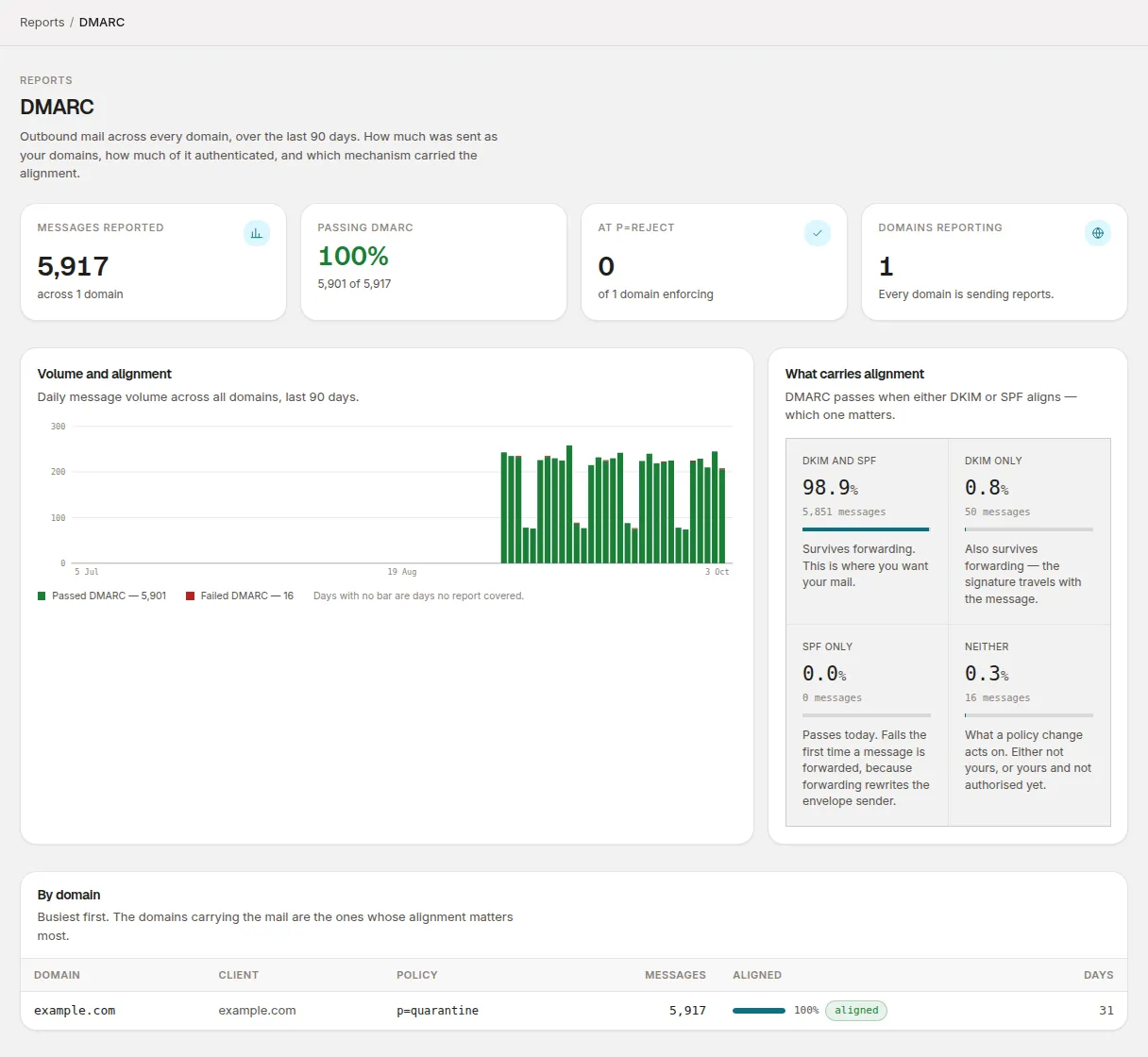
| Figure | What it counts |
|---|---|
| Messages reported | Every message receivers reported as sent from your domains in the window. |
| Passing DMARC | The share of those that passed DMARC, with the raw count underneath. |
| At p=reject | How many of your domains currently publish p=reject. |
| Domains reporting | How many domains have had at least one report in the window. If some haven’t, it says how many are not yet sending reports. |
Passing DMARC is the one figure that is coloured, because it’s a compliance result: green at 99% or more, amber above zero, red at zero. 99% rather than 100% because a stray message in a hundred thousand is noise, not a misconfiguration.
If no reports have arrived for any domain, the page says No reports have arrived yet instead, with a link to Check setup progress. See your first report for how long that normally takes.
What carries alignment
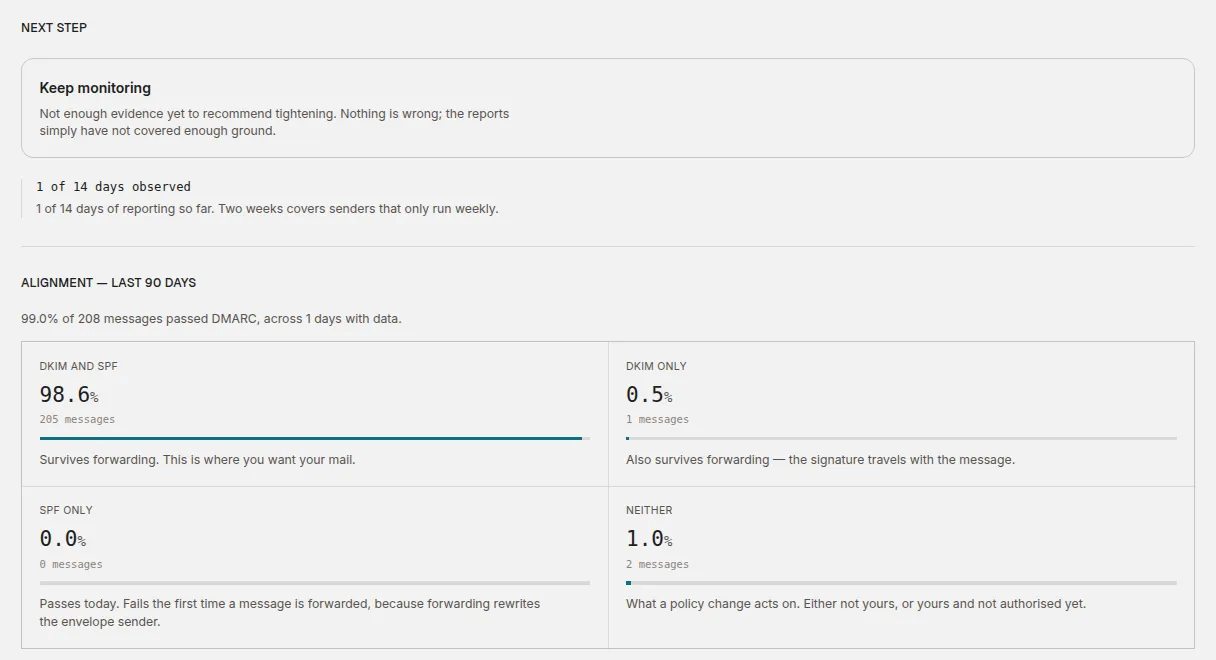
DMARC passes when either SPF or DKIM passes and is aligned with the
domain in the visible From: address. A single pass rate hides which one did
the work, and that matters, so the What carries alignment panel (and the
domain page’s alignment view) splits the mail four ways:
| Bucket | What it means |
|---|---|
| DKIM and SPF | Survives forwarding. This is where you want your mail. |
| DKIM only | Also survives forwarding — the signature travels with the message. |
| SPF only | Passes today. Fails the first time a message is forwarded, because forwarding rewrites the envelope sender. |
| Neither | What a policy change acts on. Either not yours, or yours and not authorised yet. |
The four are shown as percentages of all reported mail, each with its message count. None of them is coloured: SPF only isn’t a failure, it’s a fact about which mechanism is doing the work.
A receiver is allowed to leave a mechanism’s result out of its report. Mail reported that way doesn’t fit any of the four buckets, so occasionally they add up to slightly less than 100%.
The forwarding warning
When 10% or more of your mail passes on SPF alone, a note appears under
the breakdown, starting “N% of your mail passes on SPF alone.” That mail
fails DMARC as soon as anyone forwards it: a mailing list, an auto-forward to
a personal address, a shared mailbox rule. It’s the most common reason a domain
that looked ready at p=none starts losing mail at p=reject. The fix is
DKIM signing, aligned to your domain, at the senders concerned; see
identify your sending sources.
The By domain table
Below the chart, By domain lists every domain, busiest first. The domains carrying the mail are the ones whose alignment matters most.
| Column | What it shows |
|---|---|
| Domain | Links to the domain’s page. |
| Client | The client the domain belongs to. |
| Policy | The published DMARC policy, e.g. p=quarantine, or not published. |
| Messages | Messages reported in the window. |
| Aligned | The share passing DMARC, as a bar and a label: aligned (99% or more), partly aligned or not aligned. |
| Days | How many days in the window had report data for this domain. |
Why a domain with no mail shows a dash
A domain that had no mail reported in the window shows — under
Messages and no reports yet under Aligned, never 0%. On the domain
page, the alignment section says No reports yet for this window.
“Nothing was reported” and “nothing passed” are different facts. A 0%
would tell you a domain’s mail is broken when it may simply be new, or a
domain that doesn’t send mail at all. (A parked domain that sends nothing
should still have a DMARC record at p=reject, which is the subject of
staying at p=reject.)
A high pass rate is not a low spoofing rate
This is the most misread number in DMARC. A 98% pass rate does not mean 2% of your mail is spoofed.
- The pass rate is dominated by your own mail. Your legitimate senders make up most of the volume, so the figure mostly measures how much of your mail is set up properly.
- The failing part is a mix. Some of it is spoofing, which isn’t yours to fix. The rest is legitimate mail from a source you haven’t authorised yet, which is.
- Reports only cover receivers that send them. Mail delivered to a receiver that doesn’t report DMARC isn’t in any of these numbers.
So read the pass rate as how close your legitimate mail is to being safe to enforce, not as a measure of impersonation. Whether it’s safe to tighten the policy is decided source by source, in the sending sources list, and the policy advisor on the domain page does that for you.
Sending sources across every domain
Reports → Sending sources is the same source list as each domain’s Sending sources page, aggregated across all your domains over the last 90 days. It’s sorted worst first, then by volume: not-aligned sources at the top, because that’s where the day’s work is.
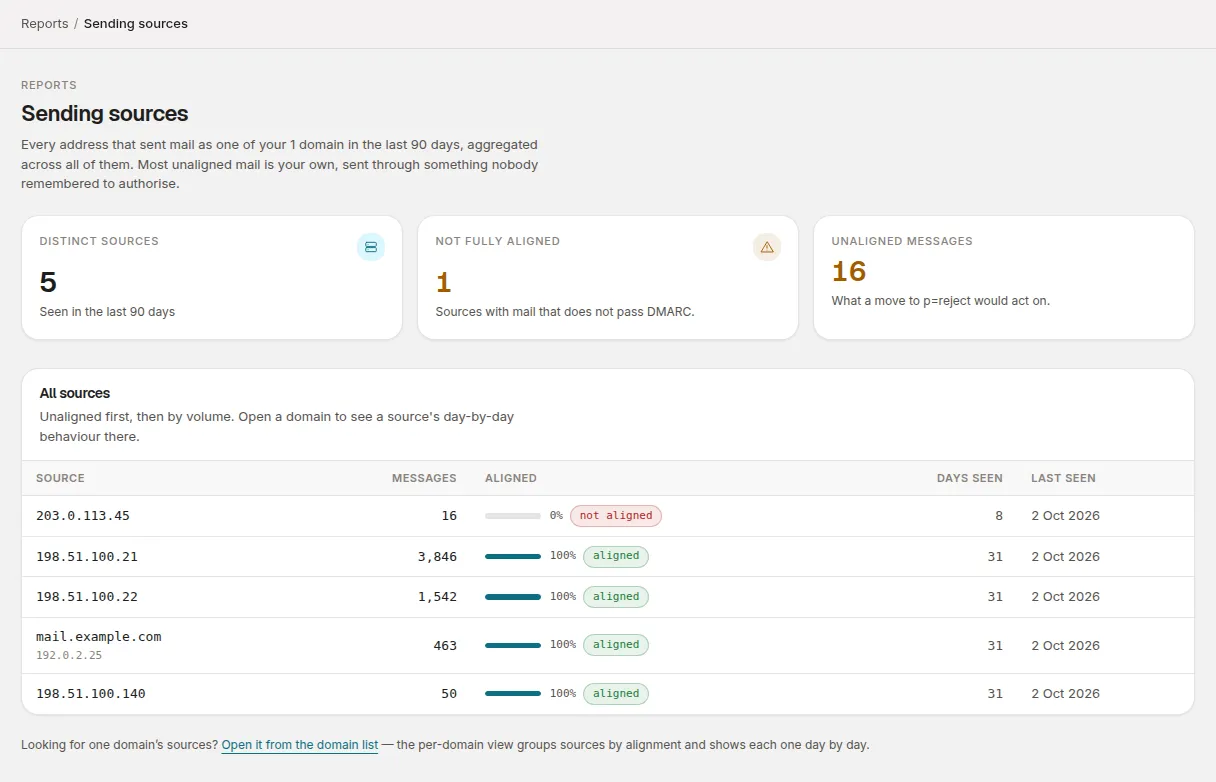
The figures at the top are Distinct sources, Not fully aligned
(sources with mail that doesn’t pass DMARC) and Unaligned messages —
what a move to p=reject would act on. The table shows each source’s
Messages, Aligned share, Days seen and Last seen.
It shows the 200 busiest sources. To work through one domain’s senders day by day, open the domain from Domains → All domains and choose Sending sources. That page, and what to do with each source, is covered in identify your sending sources; how DMARCLoop identifies sources explains where the names come from.
Related
Stuck? Reply to any email DMARCLoop sends, or contact us — a person reads it.