Your account Step 21 of 30
The email log
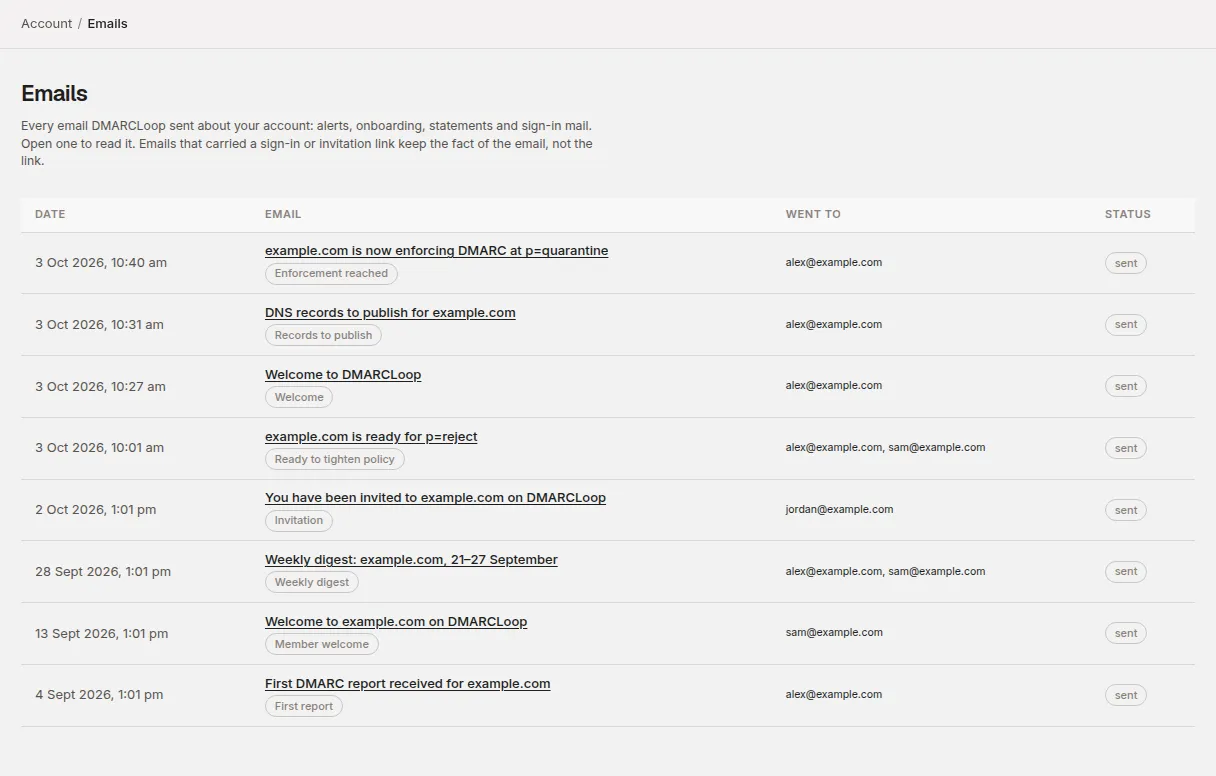
Account → Emails lists every email DMARCLoop sent about your account, who it went to and whether it arrived, so you can check without asking support.
Updated
Account → Emails is a log of every email DMARCLoop sent about your account: alerts, onboarding, statements and sign-in mail. Use it to check whether an alert went out, who it reached, or what an email said, without asking anyone to search their inbox.
It’s a record of what was sent, not a settings page. To change which emails you receive, use Notifications.
What each row shows
| Column | What it means |
|---|---|
| Date | When the email was created. |
| The subject, linked to the full email, with its kind underneath (for example DMARC record missing or Records to publish). | |
| Client | Which client it was about, or Whole account. Shown only in accounts that manage several clients. |
| Went to | The addresses it was sent to, and any cc. |
| Status | sent, pending (queued, not sent yet), failed, or suppressed. |
The newest emails are first, 100 to a page. Choose Older at the bottom to go further back.
Suppressed means we didn’t send because every address on it is on our suppression list: an earlier email to it bounced as non-existent, someone marked one of our emails as spam, or the person asked us to stop. The list covers everything DMARCLoop sends, not just your account’s mail. The email’s own page shows Went to as nobody — every address had asked us to stop sending when that applied to everyone.
Reading one email
Choose a subject to open it. The page shows when it was Sent and Created, who it was Addressed to, any CC, and the text of the email. Show as it looked in your inbox displays the formatted version.
Emails that carried a single-use link — invitations, email verification and password resets — keep the fact of the email but not the link. Their page says the contents were removed once it was sent, and only the person it went to has the link. If an invitation needs sending again, withdraw it and send a new one from Account → People.
Who can see it
Every member of the account can open Emails, including Read only members. What each person sees follows their access:
- Members who see the whole account see every email, except billing emails — statements, invoices and payments — which only owners and admins who see the whole account can see.
- Members whose access covers particular clients see emails about those clients, and not emails about the account as a whole (statements, sign-in mail for other people). In accounts that manage several clients, a client’s users only see that client’s emails if the account has turned the log on for them; by default it’s off.
When an email didn’t arrive
- Find it in the log. If it isn’t there, it wasn’t sent — check Notifications to see whether that kind is switched off, and remember Read only members don’t receive alerts.
- If it’s pending, it’s queued and will go shortly.
- If it’s sent, it left DMARCLoop. Check spam and any mail rules on the receiving side.
- If it’s failed, contact us with the date and subject. We can see why delivery failed and send it again; a resend is recorded in your access log.
- If it’s suppressed, contact us with the address.
Stuck? Reply to any email DMARCLoop sends, or contact us — a person reads it.