Reports Step 16 of 30
MTA-STS and TLS reports
How DMARCLoop monitors inbound TLS — the MTA-STS policy, the optional TLS-RPT record and the reports it brings — and the order to publish them in.
Updated
Everything else in DMARCLoop is about your outbound mail: who sends as your domain and how receivers judge it. Inbound TLS is the other direction: whether mail arriving at your domain travels over an encrypted connection.
Two standards cover it:
- MTA-STS (RFC 8461) tells sending servers that they must use TLS to reach
you, and which of your mail servers to trust. It’s a TXT record at
_mta-sts.<domain>plus a policy file served over HTTPS. - TLS-RPT (RFC 8460) asks sending servers to report whether they could.
It’s one TXT record at
_smtp._tls.<domain>.
What is MTA-STS? covers the background.
MTA-STS monitoring and TLS report figures are available on plans that include inbound TLS; the pricing page lists what each plan includes. On a plan without them, the domain page’s Inbound TLS section and Reports → MTA-STS & TLS say so. MTA-STS monitoring and TLS reporting are separate entitlements: where a plan includes the first but not the second, Reports → MTA-STS & TLS shows the MTA-STS assessment and says so under TLS report ingestion in place of the session figures.
The TLS-RPT record
The _smtp._tls record is the optional one among the records DMARCLoop gives
you when you publish the DNS records:
_smtp._tls.example.com TXT "v=TLSRPTv1; rua=mailto:t1…@reports.dmarcloop.com"
Copy the exact value from the domain page. Publishing it changes nothing about how mail is handled: it only asks senders to tell you what they saw. That’s why it should go up before any MTA-STS policy, not after. It’s the instrument that tells you whether enforcing would be safe.
The first TLS report usually arrives within a day or two. Large senders report daily, and only senders that actually deliver mail to your domain send one.
The domain page: Inbound TLS
On a verified domain’s page, the Inbound TLS section shows:
- The state, as a status: MTA-STS enforcing, MTA-STS testing,
MTA-STS withdrawn, MTA-STS broken, no MTA-STS or not checked yet,
with the policy’s
idand how long senders cache it. - A Check now button, to read DNS and the policy again straight after you’ve changed something, rather than waiting for the daily check.
- Findings, each labelled Mail at risk, Worth fixing or Suggestion, with what to do about it. With nothing to fix, it says so.
- TLS reports — last 90 days: the share of sessions that succeeded, how many reports and senders, and a table of failures by what went wrong, the server involved, the session count and the date last seen.
- Records to publish and The policy file, while you don’t yet have a working policy (below).
No MTA-STS is shown as a fault-coloured status, but most domains publish no MTA-STS policy and deliver mail perfectly well. It’s a posture to improve, not a sign that mail is being lost.
Publishing MTA-STS: the policy file first
MTA-STS is two things, and the order matters:
- Serve the policy file at
https://mta-sts.example.com/.well-known/mta-sts.txt, astext/plain, over HTTPS with a certificate valid for that name, and with no redirect. - Then publish the
_mta-stsrecord.
Never publish the _mta-sts record before the policy file is being served.
A sender that looks in the gap caches a failure.
While you have no working policy, The policy file gives you one to start from, built from your domain’s own MX records:
version: STSv1
mode: testing
mx: mail.example.com
max_age: 604800
It starts at mode: testing on purpose: senders report failures but still
deliver. An enforcing policy that leaves out one of your mail servers stops
mail to that server, and no bounce reaches you. Move to mode: enforce once
the TLS reports are clean.
Records to publish gives the _mta-sts record with an id:
_mta-sts.example.com TXT "v=STSv1; id=20261003T010203Z"
Change the id every time you edit the policy file. Senders re-fetch the
policy when the id changes, not when the file’s contents do. The daily DNS
check looks out for a policy file that changed while the id in DNS did not.
If no MX records could be read for the domain, the page doesn’t offer a policy file: a policy listing the wrong servers stops mail. The free MTA-STS Policy Generator builds the file and record too, and the MTA-STS Checker tests what’s published.
Reports → MTA-STS & TLS
Reports → MTA-STS & TLS shows the same assessment for every domain at once, so you can see whether anything is broken anywhere without opening each domain.
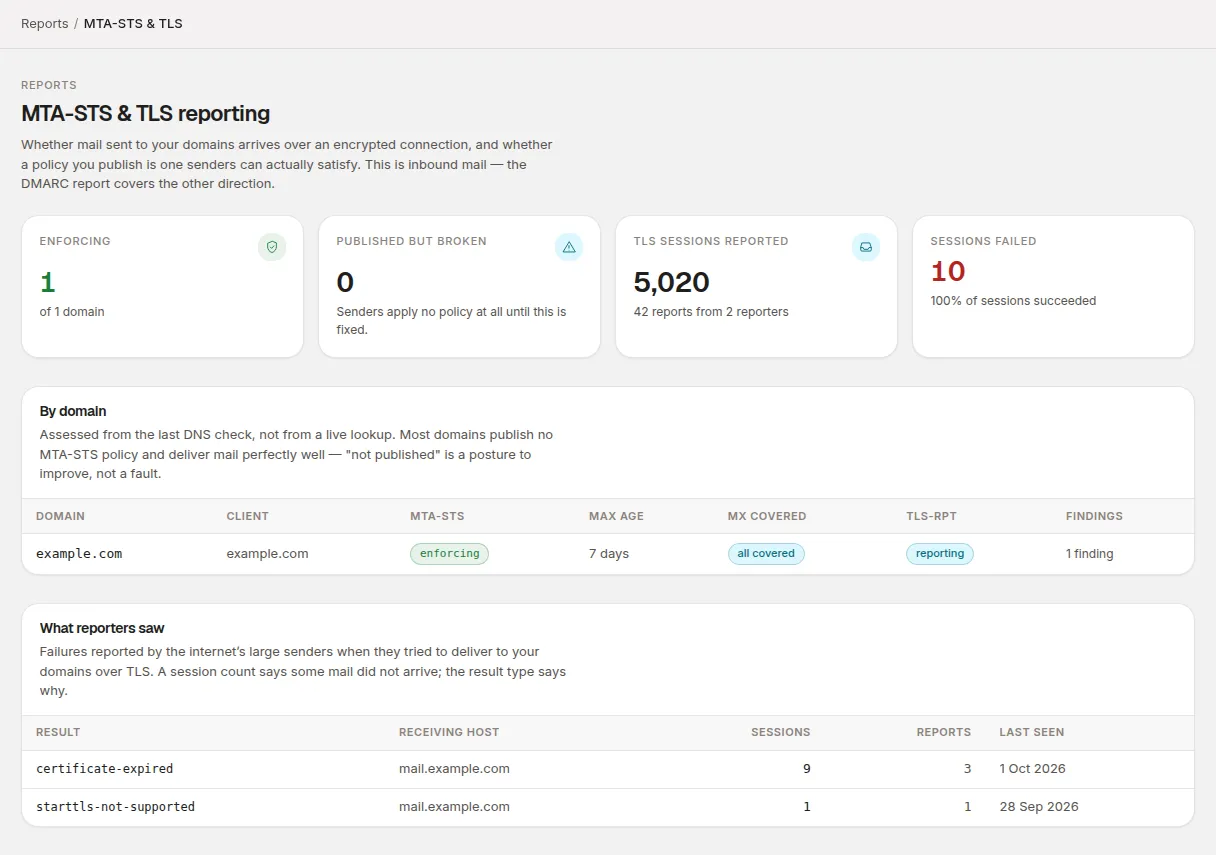
At the top:
| Figure | What it counts |
|---|---|
| Enforcing | Domains whose MTA-STS policy is in enforce mode. |
| Published but broken | Domains with an MTA-STS record whose policy senders can’t use. Until it’s fixed, senders apply no policy at all. |
| TLS sessions reported | Sessions reported over the last 30 days, with how many reports and reporters. |
| Sessions failed | Failed sessions, and the share that succeeded. |
When any domain has a finding that costs delivery now, a Mail at risk card lists it above everything else.
By domain lists every domain, broken ones first. Its columns are MTA-STS (the state), Max age, MX covered (all covered, a count of uncovered servers, or not checked), TLS-RPT (reporting, check record or not published) and Findings. It’s assessed from the last daily DNS check, not a live lookup; use Check now on the domain page to refresh one domain.
Check record under TLS-RPT usually means the record is sending reports somewhere other than DMARCLoop, or can’t be parsed.
What reporters saw lists TLS failures over the last 30 days by result
type, as the sender reported it (for example certificate-expired or
sts-policy-fetch-error), with the receiving host where all failures of that
type name the same one, the session and report counts, and when it was last
seen. A session count tells you some mail didn’t arrive; the result type tells
you why.
Time windows
| View | Window |
|---|---|
| Domain page, TLS reports — last 90 days | Rolling 90 days |
| Reports → MTA-STS & TLS, TLS figures | Rolling 30 days |
| MTA-STS state and findings | The most recent DNS check |
If no TLS reports have arrived, the figures say so rather than showing 100%. “Nothing reported” and “everything succeeded” are different facts.
Related
Stuck? Reply to any email DMARCLoop sends, or contact us — a person reads it.