Reports Step 15 of 30
Failure reports
What DMARC failure (ruf) reports collect, why they hold other people's data, and how to turn them on, set their retention and turn them off.
Updated
Aggregate reports, the ones behind everything else on your dashboard, tell
you how much mail passed and where it came from. Failure reports (DMARC’s
ruf reports, sometimes called forensic reports) add the individual
messages that failed: when a receiver rejects something claiming to be from
your domain, some receivers send a copy of its details.
They’re the one view in DMARCLoop of a single message rather than a count. That’s what makes them useful while something is being spoofed. It’s also why they’re off unless you turn them on, per domain, and why it’s worth turning them off again afterwards.
Failure reports are available on plans that include them; the pricing page lists what each plan includes. On a plan without them, the page says Not included in your plan.
Where to find them
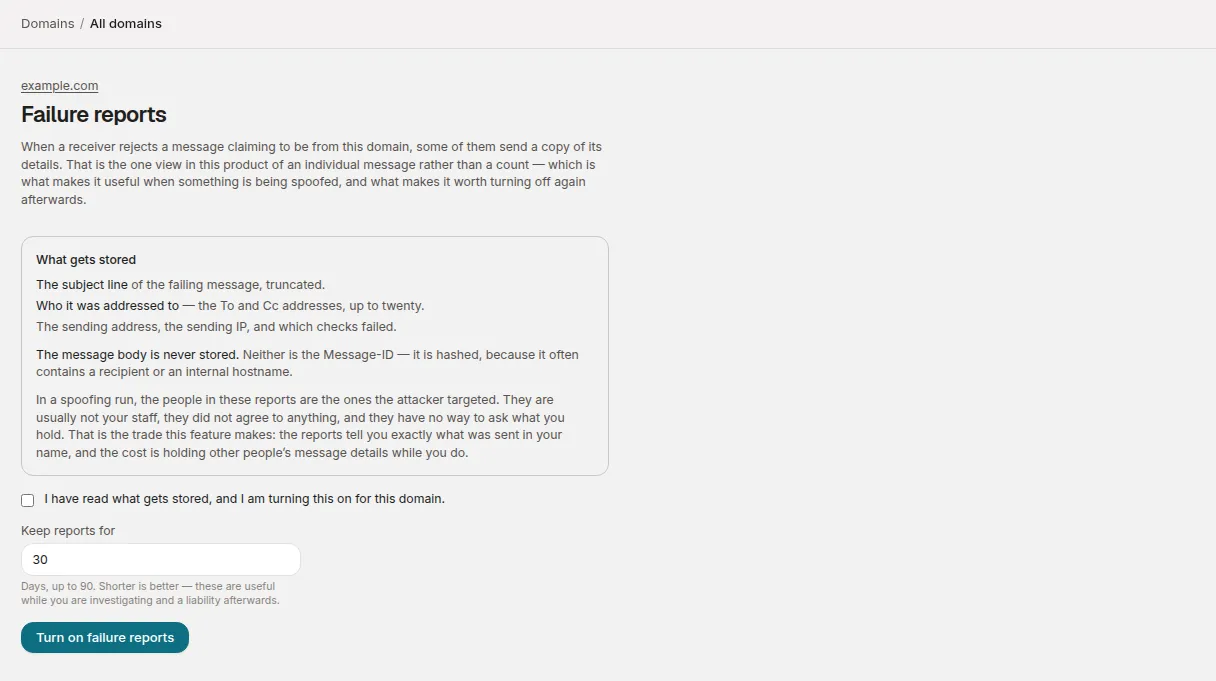
On a verified domain’s page, the Failure reports section explains what they are and links to See what it collects. That opens the domain’s Failure reports page, which states what is stored before anything is turned on.
What gets stored
This is the opt-in screen’s wording, word for word:
What gets stored
- The subject line of the failing message, truncated.
- Who it was addressed to — the To and Cc addresses, up to twenty.
- The sending address, the sending IP, and which checks failed.
The message body is never stored. Neither is the Message-ID — it is hashed, because it often contains a recipient or an internal hostname.
In a spoofing run, the people in these reports are the ones the attacker targeted. They are usually not your staff, they did not agree to anything, and they have no way to ask what you hold. That is the trade this feature makes: the reports tell you exactly what was sent in your name, and the cost is holding other people’s message details while you do.
Read the last paragraph twice. When someone spoofs your domain, the recipients in these reports are the people they targeted: customers, suppliers, strangers. Turning failure reports on is a decision to hold their addresses and the subject lines they were sent, for as long as you keep them.
Arrival times are stored to the hour, not the minute. An exact arrival time can identify a single message.
Turn them on
Only an administrator can turn failure reports on or off. Other members can see the page, which tells them so. They can’t be turned on from a support session either: someone on your account has to make the decision.
- Open the domain’s page and choose See what it collects under Failure reports.
- Read What gets stored, then tick I have read what gets stored, and I am turning this on for this domain.
- Under Keep reports for, enter a number of days, up to 90. It defaults to 30.
- Choose Turn on failure reports.
If your DMARC record is in your own DNS, the page then shows a Publish
this section with a ruf tag, in this form:
ruf=mailto:f1…@reports.dmarcloop.com
Nothing arrives until you add it to your DMARC record, alongside the
existing rua tag, for example:
v=DMARC1; p=none; rua=mailto:d1…@reports.dmarcloop.com; ruf=mailto:f1…@reports.dmarcloop.com
Copy the exact value from the page; the address is generated for this domain.
The ruf address is separate from the aggregate reporting address and only
exists once you’ve opted in, so a domain that hasn’t opted in has no address
anyone could send failure reports to.
If your DMARC record is hosted
With hosted records, the section is headed We
publish this for you instead: Your DMARC record is hosted here, so we add
this tag to it — there is nothing to change in your DNS. It is published
within a few minutes, and removed again if you turn failure reports off.
The ruf tag is still shown, and See the hosted record opens the hosted
records page, which says Failure reports are on for this domain, so the
record we publish also carries the ruf address.
The hosted record carries ruf exactly while failure reports are on, and
only DMARCLoop’s own ruf address: a ruf to another service in the record
you replaced isn’t carried over.
Retention
Keep reports for sets how long each report is kept: from 1 to 90 days, 30 by default. Reports older than that are deleted automatically, every day. The page shows the setting under Publish this, with the date the reports were turned on and who turned them on.
Shorter is better. In the screen’s words, these are useful while you are investigating and a liability afterwards. Failure reports deliberately don’t share your aggregate data’s retention: aggregate data is evidence you keep; this is a diagnostic aid made of other people’s data.
The screen doesn’t offer a way to change the period once it’s set. Turning failure reports off and on again lets you choose a new one, but turning off deletes what’s held (below).
Reading the reports
The table lists the latest 100 reports:
| Column | What it shows |
|---|---|
| When | The hour we received it, and +N more like it when repeats of the same message arrived in that hour. |
| From | The sending IP and, where the report gives one, the sending address. |
| Subject | The subject, truncated. |
| To | The first two recipients, and how many more. |
| Failed | Which checks failed, and what the receiver did with the message. |
Don’t read the count as a measurement. Most receivers never send failure reports, so the number reflects which providers happen to be rejecting your mail, not how much is being spoofed. Few reports doesn’t mean little spoofing, and more than last month doesn’t mean more spoofing. Use them to see what an individual failing message looked like, and read volume from the DMARC report.
An empty table, Nothing yet, means either nothing has failed or the receivers rejecting it don’t send these.
Turn them off
At the bottom of the page, choose Turn off failure reports, then Turn off and delete. This stops collection and deletes every report we hold for the domain. That’s deliberate: stopping collection while keeping the data would be the opposite of what turning it off means.
Then remove the ruf tag from your DMARC record so receivers stop sending
them. If the record is hosted, there’s nothing to do: we remove the ruf tag
from the hosted record within a few minutes.
Related
Stuck? Reply to any email DMARCLoop sends, or contact us — a person reads it.