Reports Step 17 of 30
Compliance reports
How Reports → Compliance assesses each domain against the ASD ISM, PCI DSS v4.0, the bulk-sender rules and NIST SP 800-177, and how to download the PDF.
Updated
Reports → Compliance sets what DMARCLoop already measures against the frameworks assessors ask about. It doesn’t collect anything new. Every verdict comes from the records your domains publish and the reports receivers send us, so nothing in it is self-declared.
Compliance reporting is available on plans that include it; the pricing page lists what each plan includes. On a plan without it, the page says Not included in your plan.
What it assesses
Each domain is assessed against four frameworks:
| Framework | What it covers here |
|---|---|
| ASD ISM — email | The email-authentication controls of the Australian Signals Directorate’s Information Security Manual and the ACSC’s domain-filtering guidance: SPF ending in -all, DKIM, DMARC at p=reject with reporting, and subdomains covered. |
| PCI DSS v4.0 — 5.4.1 | The outbound anti-spoofing half of requirement 5.4.1: a DMARC record, an enforced policy, SPF, DKIM and subdomain coverage. |
| Bulk sender requirements | The authentication rules Google and Yahoo (February 2024) and Microsoft Outlook.com (May 2025) set for bulk senders: SPF, DKIM, a DMARC record, and mail that passes and aligns. |
| NIST SP 800-177r1 | The domain-owner controls in NIST’s Trustworthy Email: SPF ending in -all, DKIM, DMARC enforced with reporting, and inbound transport security (MTA-STS). |
It is not an Essential Eight report. Email authentication isn’t one of the Essential Eight strategies, despite how often the two are mentioned together. The Australian guidance that does cover SPF, DKIM and DMARC is the ISM’s email guidelines, which is what the ASD ISM — email section assesses.
Each framework starts with a scope note saying what it does and doesn’t cover. Read it before quoting a result. For example, PCI DSS 5.4.1 also covers protecting your own staff from inbound phishing, which is a mail-gateway control DMARCLoop can’t see; your assessor will want evidence of both.
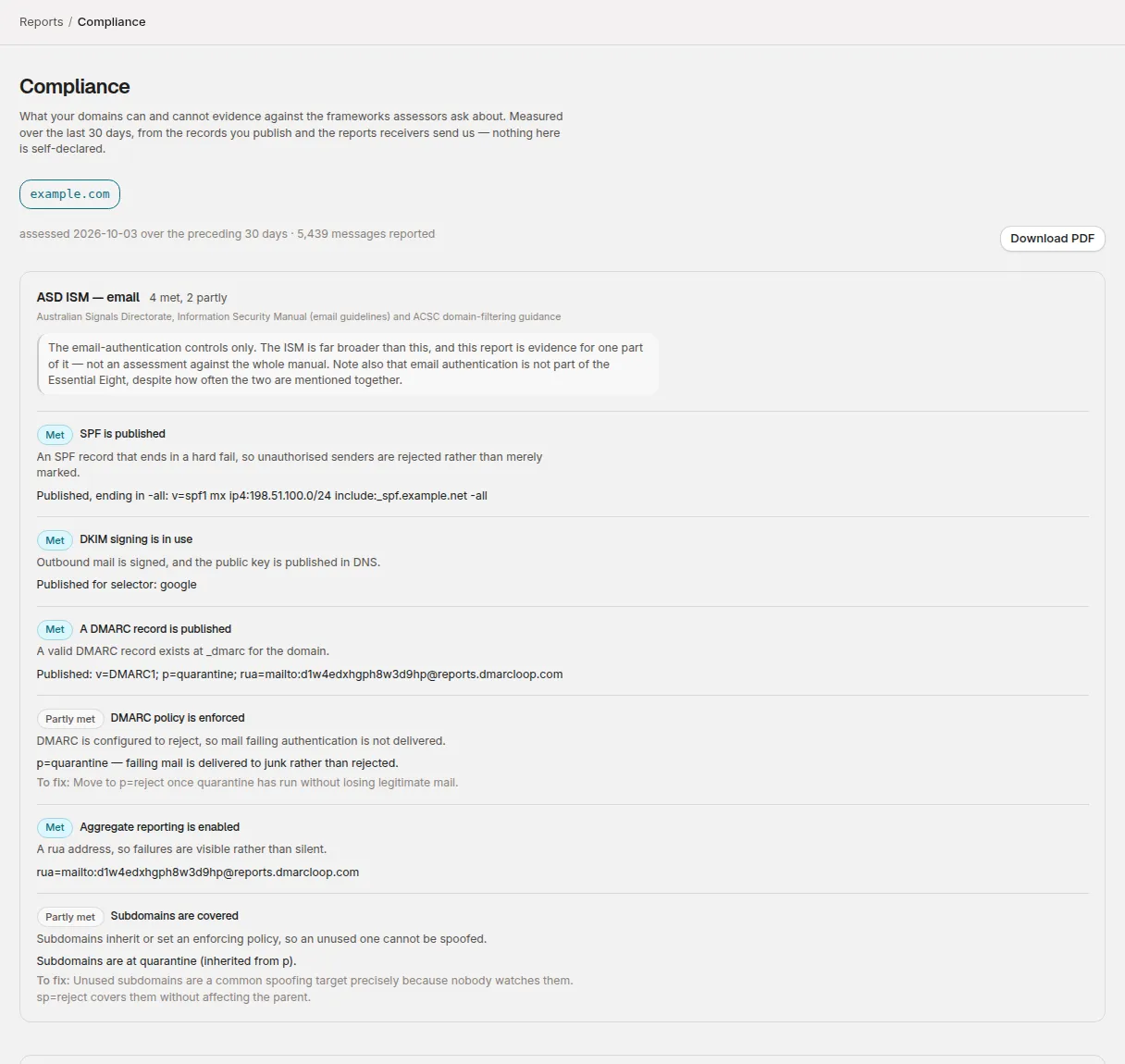
Reading a result
Choose a domain from the row of domains at the top. The line under it gives the period: assessed today over the preceding 30 days, with how many messages were reported, or no reports received in that window.
Each control shows a verdict, what the framework asks for, what we observed, and, where it isn’t met, To fix: with the next step.
| Verdict | Meaning |
|---|---|
| Met | Observed and satisfied. |
| Partly met | Mostly there. For example, SPF published but ending in ~all, or p=quarantine where the framework asks for p=reject. |
| Not met | Observed and not satisfied. |
| No evidence | We haven’t observed it, so we don’t give a verdict either way. |
No evidence is a result, not a failure. A domain whose SPF record we haven’t read yet isn’t a domain without SPF. Three common cases:
- DKIM shows No evidence when no DKIM selectors are known for the domain. Selectors can’t be discovered from DNS, so this is not evidence that DKIM is missing. The fix is under DKIM selectors on the domain page (see DKIM selectors): add the selectors your mail provider gave you. A selector that passes DKIM for the domain in an aggregate report is added there automatically, and its key is checked within a day of that report arriving. A selector learned from a report whose key isn’t published doesn’t count against the domain here; one you added yourself does. The DKIM Inspector checks a key under a selector you name.
- One-click unsubscribe and Spam complaint rate below 0.3%, in the bulk-sender section, are always No evidence. They’re properties of your sending platform and the receiving provider, not of DNS or DMARC reports. Google Postmaster Tools reports the complaint rate for Gmail.
- A domain added an hour ago shows No evidence for most things until its first DNS check has run.
What counts as enforced
The DMARC policy is enforced control is only Met at p=reject
applied to all mail. p=quarantine, p=reject in testing mode (t=y), or
p=reject applied to a sample are Partly met: the record names a policy,
but some failing mail is still delivered. p=none is Not met; it’s a
monitoring position, not a protective one. The
14-day and 30-day reviews
cover moving through those steps.
Mail authenticates and aligns
In the bulk-sender section, this control is Met when 99% or more of reported mail passed DMARC over the 30 days, Partly met from 95%, and Not met below that. Some of what fails is spoofing, which isn’t yours to fix; work through your sending sources for the rest.
Download the PDF
Download PDF produces the same assessment for the selected domain as a PDF: the domain, the 30-day period, when it was generated, and each framework with its scope note, verdicts, evidence and fixes. It’s built to be forwarded to an assessor.
The button only appears once the domain is verified. An unverified domain shows This domain has not been verified; the assessment is still shown for reference, but a PDF that states its findings were measured shouldn’t be produced for a domain whose ownership hasn’t been confirmed. See verify your domain.
To send a regular DMARC summary on a schedule instead, see saved and scheduled reports.
For MSPs
Each domain’s client is named on the assessed line and in the PDF. Compliance reporting can also be shown or hidden for an individual client: if a client’s domains are missing from the page, contact us and we’ll check the setting.
Related
Stuck? Reply to any email DMARCLoop sends, or contact us — a person reads it.