Your account Step 27 of 39
Use an AI assistant with DMARCLoop
Connect Claude, Claude Desktop, Claude Code or ChatGPT to DMARCLoop by signing in or with an API key, through the MCP server or the agent skill.
Updated
An AI assistant such as Claude can read DMARCLoop for you: which domains are
failing, who sends as them, what stands between a domain and p=reject, and
what to publish next. It uses the same API, so it sees what
you, or the key you give it, can see, and nothing more. API access is a plan
feature; see pricing.
Connect Claude by signing in
In claude.ai or Claude Desktop, go to Customize > Connectors, choose Add
custom connector, and enter https://app.dmarcloop.com/mcp. Then connect it:
- Sign in to DMARCLoop, if you aren’t already.
- Choose the organisation Claude will work in, then Continue. If you manage clients, choosing your own organisation includes them.
- Check what Claude is asking for. It can always read your domains, reports, sending sources, the adviser and DNS records. Tick Also add domains and publish DNS records only if you want it to make changes; it can then do only what your role allows. Choose Allow, or Deny.
Claude acts as you: if you leave the organisation, or your role changes, so
does what it can do. To stop it, go to Your account > Connected apps and
choose Disconnect: its next request is refused, and it has to be connected
again. Claude Code signs in the same way: add the server without
a key, then run /mcp in Claude Code and choose to authenticate.
claude mcp add --transport http dmarcloop https://app.dmarcloop.com/mcp
Signing in works on app.dmarcloop.com. Under a partner’s own brand, use an API
key, as below.
Connect ChatGPT
ChatGPT connects the same way, by signing in. Custom connectors are on ChatGPT Business, Enterprise and Edu, on the web, and a workspace admin adds them. (On ChatGPT Pro they can only read.)
- In ChatGPT, open Plugins, choose +, then Add custom MCP server.
- Enter
https://app.dmarcloop.com/mcp, set its authentication to OAuth, and create it. - Sign in to DMARCLoop, choose the organisation and allow access, as above.
ChatGPT asks you before it runs anything that makes a change. It shows under Your account > Connected apps like Claude, and Disconnect stops it. ChatGPT can’t use an API key, so it can’t connect under a partner’s own brand.
Or use an API key
For a script, an assistant that can’t sign in, or a partner’s branded address, create an API key under API keys (see Use the API). Choose Read-only unless you want the assistant to add domains or publish records: a read-only key isn’t even offered those tools.
Keep the key out of the chat. Set it as an environment variable where the assistant runs:
export DMARC_API_KEY=<key>
Connect over MCP with the key
DMARCLoop runs an MCP server at https://app.dmarcloop.com/mcp. Each API
operation is a tool, with its inputs and results described. API keys shows
the address and the command under Use with an AI assistant.
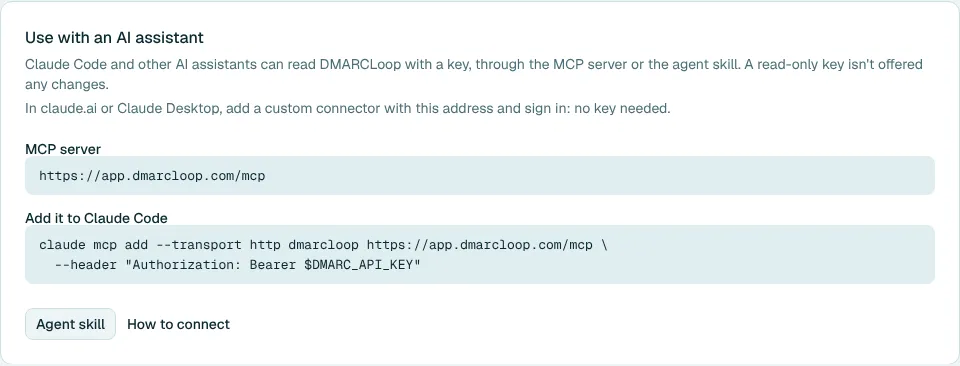
In Claude Code, with the key:
claude mcp add --transport http dmarcloop https://app.dmarcloop.com/mcp \
  --header "Authorization: Bearer $DMARC_API_KEY"
Any assistant that supports MCP over HTTP with a bearer token connects the same
way. If you use DMARCLoop under a partner’s own brand, use the address you sign
in at in place of app.dmarcloop.com.
Or add the skill
The skill tells an assistant how to use the API well: start with the key, use the board for the overview, preview a record before publishing it. It works with or without the MCP server. For Claude Code:
mkdir -p ~/.claude/skills/dmarc-reporting
curl -o ~/.claude/skills/dmarc-reporting/SKILL.md \
  https://app.dmarcloop.com/api/v1/skill.md
What to ask
- Which of my domains need attention this week?
- Who is sending as example.com, and which sources fail DKIM?
- What’s blocking example.org from moving to p=reject?
- Compare example.net’s pass rate for the first two weeks of September.
- Preview a DMARC record for example.com at p=quarantine.
The assistant works from the board, each domain’s report, its sources and the adviser’s assessment. Reporting covers the last 7, 30 or 90 days, or any range of up to 90 days you name.
Changes it makes
Claude, signed in with changes allowed, or an admin key can add domains and publish records. The assistant previews a record first and should ask you before publishing it. Every change is in the audit log, with you, or the key, as the actor. A record’s earlier versions are under DNS records, and Roll back to this restores one.
Failure reports aren’t available to API keys, so an assistant never sees them.
Next
Stuck? Reply to any email DMARCLoop sends, or contact us - a person reads it.